Security Guide
5 Critical MCP Security Mistakes Every New Developer Makes
We see the same five mistakes in almost every MCP server we review. Each one is easy to make and straightforward to fix. Here is what they look like and how to avoid them.
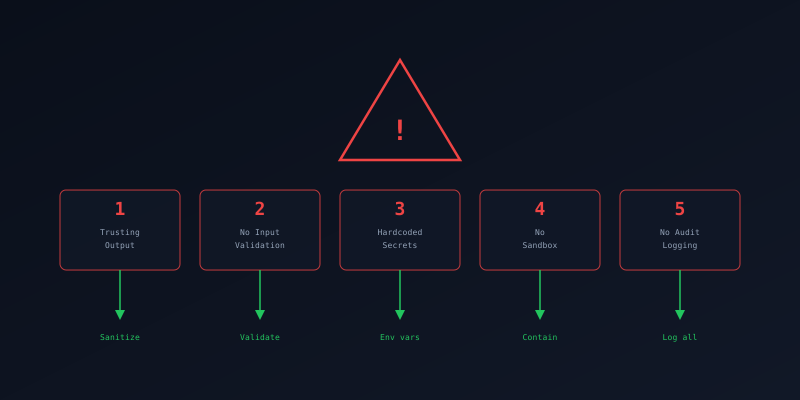
Trusting Tool Output Blindly
The output from an MCP tool is not safe by default
MCP servers return arbitrary content. If your application renders that content in a browser, executes it as code, or passes it to another tool without validation, you have an injection vector. A compromised or malicious server can return HTML with scripts, shell commands, or prompt injection payloads.
Rendering tool output as trusted HTML
# Agent gets tool result and passes it straight to the UI
result = await mcp_client.call_tool('search', {'q': query})
return render_html(result.content)  # XSS if content has <script>
Escaping tool output before rendering
import html

result = await mcp_client.call_tool('search', {'q': query})
safe_content = html.escape(str(result.content))
return render_template('results.html', content=safe_content)
Takeaway: Treat every tool response like untrusted user input. Escape, sanitize, or validate before using it in any context.
No Input Validation
Letting the AI model decide what is safe
The AI model is not a security boundary. It will pass whatever the user asks for, including path traversal strings, SQL injection payloads, and oversized inputs. If your tool handler trusts that the model sent clean data, you have no defense against prompt injection or adversarial inputs.
No validation on a destructive operation
@mcp.tool()
def delete_file(path: str) -> str:
    os.remove(path)  # Deletes ANYTHING, including /etc/passwd
    return f"Deleted {path}"
Path validation with directory confinement
from pathlib import Path

SAFE_DIR = Path("/app/workspace").resolve()

@mcp.tool()
def delete_file(path: str) -> str:
    """Delete a file from the workspace only."""
    target = (SAFE_DIR / path).resolve()
    if not str(target).startswith(str(SAFE_DIR)):
        raise ValueError("Access denied: outside workspace")
    if not target.exists():
        raise ValueError("File not found")
    target.unlink()
    return f"Deleted {target.name}"
Takeaway: Validate every input at the tool level. Type check, length limit, allowlist, and resolve paths. The model is the requester, not the validator.
Hardcoded Secrets in Config
API keys in source code, Docker images, and git history
MCP servers need credentials to access databases, APIs, and services. Hardcoding them means they end up in version control, container images, CI logs, and error messages. Once in git history, they are effectively permanent.
Credentials in source code
mcp = FastMCP("my-server")

DB_URL = 'postgresql://admin:s3cret@prod-db:5432/app'
GITHUB_TOKEN = 'ghp_xxxxxxxxxxxxxxxxxxxxxxxxxxxxxxxxxxxx'
Secrets from environment variables
import os

# Crash at startup if secrets are missing
DB_URL = os.environ["DATABASE_URL"]
GITHUB_TOKEN = os.environ["GITHUB_TOKEN"]

# Or use a secrets manager:
# from aws_secretsmanager import get_secret
# DB_URL = get_secret("prod/db-url")
Takeaway: Secrets come from environment variables or a secrets manager. Never source code. Add a pre-commit hook that scans for high-entropy strings.
Running Without a Sandbox
Full host access for a tool that reads files
An MCP server running directly on the host has access to the entire filesystem, network, and all running processes. If it has a vulnerability or gets compromised, the attacker owns the host. Containers and VMs exist to limit blast radius.
Running on bare metal with full access
# Running directly on the host
python server.py

# Server can access:
# - All files on the system
# - All network interfaces
# - All environment variables
# - All running processes
Containerized with resource limits and no network
# Dockerfile
FROM python:3.12-slim
RUN useradd -r -s /bin/false mcpuser
WORKDIR /app
COPY requirements.txt .
RUN pip install --no-cache-dir -r requirements.txt
COPY server.py .
USER mcpuser
CMD ["python", "server.py"]

# docker run --read-only --tmpfs /tmp \
#   --memory=256m --cpus=0.5 \
#   --network=none \
#   my-mcp-server
Takeaway: Run MCP servers in containers with read-only filesystems, resource limits, non-root users, and minimal network access. Default deny on everything.
No Audit Logging
When something goes wrong, you have no trail
Without audit logs, you cannot tell what tools were called, by whom, with what parameters, or whether they succeeded. When a security incident happens (and it will), you are flying blind. Compliance frameworks also require audit trails for automated actions.
No logging on a sensitive operation
@mcp.tool()
def transfer_funds(from_acct: str, to_acct: str, amount: float):
    db.execute(transfer_query, from_acct, to_acct, amount)
    return "Transfer complete"
    # No record of who called this, when, or with what params
Structured audit logging on every call
import json, logging
from datetime import datetime, timezone

audit = logging.getLogger("mcp.audit")

@mcp.tool()
def transfer_funds(from_acct: str, to_acct: str, amount: float):
    """Transfer funds between accounts."""
    audit.info(json.dumps({
        "ts": datetime.now(timezone.utc).isoformat(),
        "tool": "transfer_funds",
        "params": {"from": from_acct, "to": to_acct, "amount": amount},
        "caller": get_caller_id(),
    }))
    try:
        db.execute(transfer_query, from_acct, to_acct, amount)
        audit.info(json.dumps({"tool": "transfer_funds", "ok": True}))
        return "Transfer complete"
    except Exception as e:
        audit.error(json.dumps({"tool": "transfer_funds", "error": str(e)}))
        raise
Takeaway: Log every tool invocation with caller, parameters (redacted), timestamp, and outcome. Forward logs to a SIEM. Set retention policies.
The Pattern
All five mistakes share a root cause: treating the AI agent as a trusted internal component instead of an untrusted external client. The fix is the same mental model used in web security for decades:
- Never trust input — validate at the boundary, not in the caller
- Never trust output — sanitize before rendering or forwarding
- Minimize blast radius — sandbox, scope permissions, limit network
- Record everything — structured logs are your incident response lifeline
Want the full checklist? Or ready to build a secure server from scratch?