Beginner Guide
MCP for Beginners: What Is the Model Context Protocol?
No jargon. No prerequisites. Just a clear explanation of how AI agents connect to tools using MCP, and why it matters.
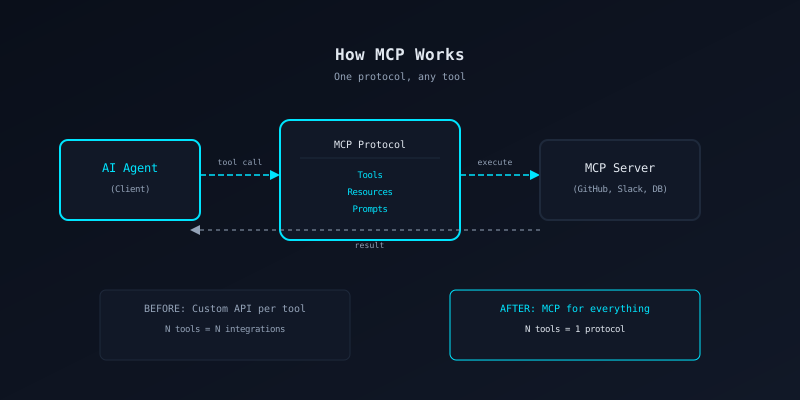
The Problem MCP Solves
Before MCP
Every AI tool integration was custom. Want your agent to use GitHub? Write a GitHub integration. Slack? Another integration. Database? Another one. Each with its own auth flow, error handling, and data format.
10 tools meant 10 custom integrations. 100 tools meant 100. None of them shared code, patterns, or security practices.
After MCP
One protocol for everything. Every tool speaks the same language. Your agent connects to any MCP server the same way, whether it wraps GitHub, Slack, a database, or your own internal API.
10 tools or 100 tools—one integration pattern. Security, logging, and error handling work the same everywhere.
Key Concepts in Plain Language
MCP Server
A small program that exposes capabilities (tools, data, prompts) to AI agents over a standard protocol.
Think of it as a waiter in a restaurant. It takes orders (tool calls) and brings back results. The kitchen (your database, API, file system) does the real work.
MCP Client
The AI agent or application that connects to MCP servers and calls their tools.
The customer at the restaurant. It reads the menu (tool list), places an order (tool call), and gets a meal (result) back.
Tool
A specific action an MCP server can perform. Like "read a file", "search a database", or "send a message".
An item on the menu. Each tool has a name, a description of what it does, and a list of parameters it accepts.
Resource
A piece of data an MCP server can provide. Like a file, a database record, or a configuration value.
The daily specials board. Information the server makes available for the client to read, without the client having to ask for a specific action.
Prompt
A pre-written template that helps the AI agent use tools correctly. Servers can suggest how to phrase requests.
The waiter recommending a dish. "If you like fish, try the salmon" helps you order better.
How a Tool Call Works (End to End)
Discovery
The client connects to the server and asks: "What tools do you have?" The server replies with a list of tool names, descriptions, and parameter schemas.
Selection
The AI model reads the tool list and decides which tool to call based on the user request. For example: "The user wants to read a file, so I will call the read_file tool."
Invocation
The client sends a structured request to the server: tool name + parameters. This is a JSON message over the MCP protocol, not a raw HTTP call.
Execution
The server validates the inputs, runs the operation (reads the file, queries the DB, etc.), and prepares a result.
Response
The server sends the result back to the client. The AI model incorporates it into its response to the user. Done.
A Concrete Example
You ask your AI assistant: “What issues are assigned to me on GitHub?”
The AI model never touches the GitHub API directly. The MCP server handles auth, rate limits, and error handling. The model just calls tools and reads results.
What Next?
Now that you understand the basics, pick your path: