Hosted MCP
MCP Sandbox — Run Custom MCP Servers Securely
Upload your Python FastMCP code. We sandbox it in gVisor containers with kernel-level isolation, encrypted secrets, network egress control, and DLP scanning on every tool call. You write the logic — we handle the infrastructure and security.
Definition
What is an MCP Sandbox?
MCP servers give AI agents superpowers — they can query databases, call APIs, process files, and interact with any external system. But running custom MCP server code means trusting that code with your infrastructure, your secrets, and your users' data.
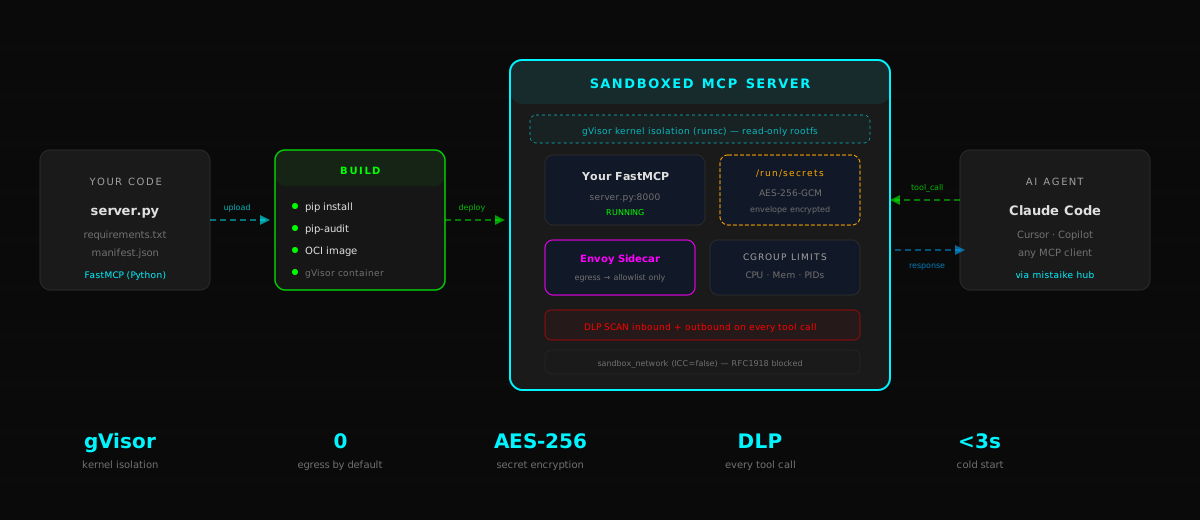
An MCP sandbox is a secure hosting environment purpose-built for running untrusted or custom MCP server code. Instead of deploying your FastMCP server on bare metal or a VM, you upload your Python code to the sandbox platform. The platform builds it in an isolated container, injects your secrets securely, restricts network egress to only the domains you declare, and wraps every tool call with DLP and content safety scanning.
mistaike.ai's sandbox uses gVisor — the same kernel-level sandboxing technology that Google uses to isolate workloads in Google Cloud. Your code runs inside a user-space kernel that intercepts every syscall. Even if your code is compromised, the attacker cannot escape the sandbox, access other containers, or reach internal infrastructure.
The sandbox is not just isolation — it's a complete managed platform. You get versioned deployments, one-click rollback, live resource metrics, encrypted log viewing, and per-tool-call billing. Your MCP servers appear in the hub directory alongside your registered external servers, and your AI agents connect to them through the same endpoint they already use.
Lifecycle
From Code to Production in Minutes
Four steps from your Python file to a live, secured MCP server.
Upload
Upload a tar.gz with your FastMCP server code and requirements.txt. Or point us at a git repo.
Build
We install your dependencies in a disposable gVisor container, run pip-audit for vulnerabilities, and commit a clean OCI image.
Deploy
Your server boots in a sandboxed container with your resource limits, secret injection, and Envoy egress control.
Connect
Your AI agents call your custom tools through the same mistaike hub endpoint. DLP scans every request and response.
Security
Defence in Depth
Six layers of isolation between your code and everything else.
gVisor Kernel Isolation
Every container runs under runsc — a user-space kernel that intercepts syscalls. No shared kernel with the host.
Read-Only Rootfs
Container filesystem is immutable. Writable space limited to a size-capped tmpfs. No persistent state, no filesystem escape.
Network Egress Control
Envoy sidecar forces all outbound traffic through a domain allowlist. No wildcards. RFC1918 addresses blocked. Your code cannot reach internal infrastructure.
Encrypted Secrets
Secrets are envelope-encrypted at rest (AES-256-GCM with HKDF-derived keys). Injected to a tmpfs mount at boot, then unmounted after read.
DLP on Every Call
Inbound tool arguments scanned for secrets and PII before reaching your code. Outbound responses scanned for prompt injection and data leaks.
Resource Cgroups
Hard CPU, memory, PID, and storage limits per container. No noisy neighbours. OOM kills are clean — no host impact.
Resources
Configurable Per Server
Slide the resources to match your workload. Upgrade or downgrade without redeploying.
CPU
0.1 – 2.0 vCPU
Memory
128 MB – 2 GB
Storage
10 – 500 MB tmpfs
Processes
16 – 256 PIDs
Platform
Everything You Need to Run MCP Servers
Not just hosting — a managed platform with observability, rollback, and billing built in.
Versioned Deployments
Every deploy creates a new immutable version. Roll back to any previous version with one click. Build logs retained for debugging.
Live Metrics
Real-time CPU, memory, storage, and PID gauges with 1-hour sparkline history. Know exactly what your server is doing.
Encrypted Logs
Server stdout/stderr captured and DLP-stripped before display. Sensitive content never reaches the browser.
Domain Allowlists
Declare which external domains your server can reach. FQDN-only — no wildcards, no IP ranges, no surprises.
Secret Management
Add secrets via the dashboard. Values encrypted at rest, injected at boot, never displayed after creation. Rotate by replacing.
Warm Pool
5-minute idle TTL keeps your server warm between calls. Cold boot under 3 seconds. No charge during idle time on metered plans.
Use Cases
What People Build
Internal API Bridges
Expose internal REST APIs as MCP tools without opening your network. The sandbox reaches your API through the domain allowlist; your agents connect through the hub.
Data Processing Pipelines
Run Python data processing — pandas, numpy, custom transforms — as MCP tools. Agents invoke them inline during conversations. DLP ensures no PII leaks out.
Custom Integrations
Connect to any service — Jira, Slack, Notion, your own database — without publishing a public MCP server. Private tools, private data, full DLP coverage.
FAQ
Frequently Asked Questions
What is an MCP sandbox?
A secure hosting environment where you upload custom Python MCP server code and mistaike.ai runs it in isolated gVisor containers with DLP scanning on every tool call.
How is an MCP sandbox different from self-hosting?
Self-hosting means managing your own infrastructure, security, networking, and scaling. An MCP sandbox handles all of that — your code runs in a hardened container with network isolation, envelope-encrypted secrets, and automatic DLP/content safety scanning. You focus on the logic.
What security controls does the sandbox provide?
gVisor kernel-level isolation, read-only rootfs, cgroup resource limits (CPU, memory, PIDs, storage), Envoy sidecar egress control with FQDN-only domain allowlists, envelope-encrypted secrets via AES-256-GCM, and DLP scanning on every inbound and outbound tool call.
What languages are supported?
Python with FastMCP. Your requirements.txt must use pinned versions (== only). Dependencies are audited for known vulnerabilities during the build step.
How does billing work?
Two models: flat fee per server (fixed monthly), or metered per minute of container warm time. No charge during idle periods on metered plans. Resource slider changes take effect on the next boot.
Get Started
Deploy Your Custom MCP Server
Upload your FastMCP code, configure resources and secrets, and your server is live behind the mistaike firewall — all in under five minutes.