Architecture Guide
MCP Mesh Explained: How AI Agents Team Up Securely
One agent calling one tool is simple. But real-world AI workflows involve multiple agents, multiple tools, and complex coordination. Here is how MCP mesh topologies work, when to use each one, and how to keep them secure.
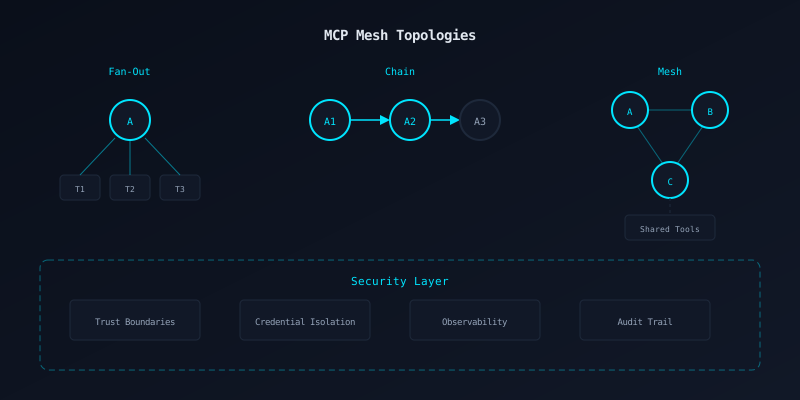
Why Think About Topology?
Most MCP tutorials show one agent calling one server. That works for demos. In production, you quickly hit limitations:
- Permission sprawl: one agent needs credentials for every service it touches. A single compromise exposes everything.
- Context window limits: one agent cannot hold the full context of a complex task. Splitting work across specialized agents is more efficient.
- Audit requirements: in regulated environments, you need to trace exactly which agent made which decision and why. A flat architecture makes this hard.
Fan-Out
One agent, many toolsA single AI agent connects to multiple MCP servers simultaneously. Each server provides different capabilities. The agent decides which tools to call based on the user request.
How It Works
The agent discovers tools from all connected servers at startup. When it needs to act, it picks the right tool from the combined list. The servers do not know about each other.
Use Case
A developer assistant that can search code (GitHub server), manage tasks (Jira server), query databases (Postgres server), and send notifications (Slack server).
Example
User asks: "Find the bug in the auth module, create a ticket, and notify the team." The agent calls GitHub search, then Jira create, then Slack post. Three servers, one conversation.
Strengths
- Simple to set up and reason about
- Each server is independent and replaceable
- Agent handles all coordination
Trade-offs
- Single agent is a bottleneck
- Agent needs broad permissions
- No server-to-server communication
Chain
Agent to agentOne agent calls another agent, which calls another. Each agent in the chain has its own set of tools and a specific role. Output from one becomes input to the next.
How It Works
Agent A is the coordinator. It calls Agent B (which has code analysis tools) and passes the result to Agent C (which has deployment tools). Each agent only sees what it needs.
Use Case
A CI/CD pipeline where a planning agent designs the approach, a coding agent implements it, a review agent checks the code, and a deploy agent ships it.
Example
Coordinator agent receives "Deploy the hotfix." It chains: Code Agent (writes the fix) then Review Agent (checks it) then Deploy Agent (ships it). Each agent has different tool access.
Strengths
- Clear separation of concerns
- Each agent has minimal permissions
- Easy to audit the decision chain
Trade-offs
- Latency grows with chain length
- Failure in one link breaks the chain
- Harder to parallelize work
Mesh
Many agents, shared toolsMultiple agents collaborate on a task, potentially sharing access to the same set of MCP servers. Agents can communicate with each other and coordinate work in parallel.
How It Works
A central hub (or peer-to-peer protocol) routes tool calls from any agent to the appropriate server. Agents can share results, delegate subtasks, and work concurrently. The hub enforces access control per agent.
Use Case
Enterprise workflows where a security team agent, a compliance agent, and a development agent all need access to the same codebase and issue tracker, but with different permission levels.
Example
Security agent scans for vulnerabilities, compliance agent checks policy, dev agent writes fixes. All three access the same GitHub MCP server but with different scopes. The mesh hub ensures the security agent cannot push code and the dev agent cannot modify compliance rules.
Strengths
- Parallel execution across agents
- Granular per-agent permissions
- Scales to complex workflows
Trade-offs
- Most complex to configure
- Requires a trust model between agents
- Observability is critical and harder
When to Use Each Topology
| Scenario | Topology | Why |
|---|---|---|
| Developer assistant | Fan-out | One user, multiple tools, simple coordination |
| CI/CD pipeline | Chain | Sequential stages with clear handoffs |
| Research pipeline | Chain | Gather, analyze, synthesize in order |
| Enterprise code review | Mesh | Security, compliance, and dev agents need shared access |
| Multi-team collaboration | Mesh | Parallel work with different permission levels |
| Quick prototype | Fan-out | Start simple, evolve to chain or mesh when needed |
Securing Your Mesh
Trust Boundaries
Every connection between agents or between an agent and a server is a trust boundary. Define explicitly what each participant can see and do. Never assume that because Agent A is trusted, Agent B (which A called) should be trusted too.
Applies to: All topologies. In fan-out, the boundary is between the agent and each server. In chains, between each pair of agents. In mesh, between every participant and the hub.
Credential Isolation
Each agent gets its own credentials with the minimum scope needed for its role. A review agent does not need deploy keys. A monitoring agent does not need write access. Credentials are never shared between agents, even in the same mesh.
Applies to: Critical in mesh and chain topologies where multiple agents access the same servers. The hub or orchestrator must issue scoped tokens per agent.
Observability
Every tool call, every agent-to-agent message, and every decision point must be logged with a correlation ID that ties the entire workflow together. Without this, debugging a mesh of agents is impossible.
Applies to: Increasingly important as topology complexity grows. Fan-out needs per-call logs. Chains need trace IDs across agents. Mesh needs full distributed tracing.
Blast Radius Containment
If one agent in the mesh is compromised, how much damage can it do? The answer should be: only what its scoped credentials allow. Compromising the code review agent should not give access to production deployment or customer data.
Applies to: Most critical in mesh, where a compromised agent could attempt to influence other agents through shared tool access or manipulated results.
Build Your Mesh
Start with fan-out. Graduate to chains when you need separation of concerns. Move to mesh when you need parallel, multi-agent workflows with granular access control.