MCP Security Guide
The Real MCP Attack Surface
Not a scare piece. Just an honest map of where things can go wrong in an MCP deployment, and what to do about each one. Know your terrain before you build on it.
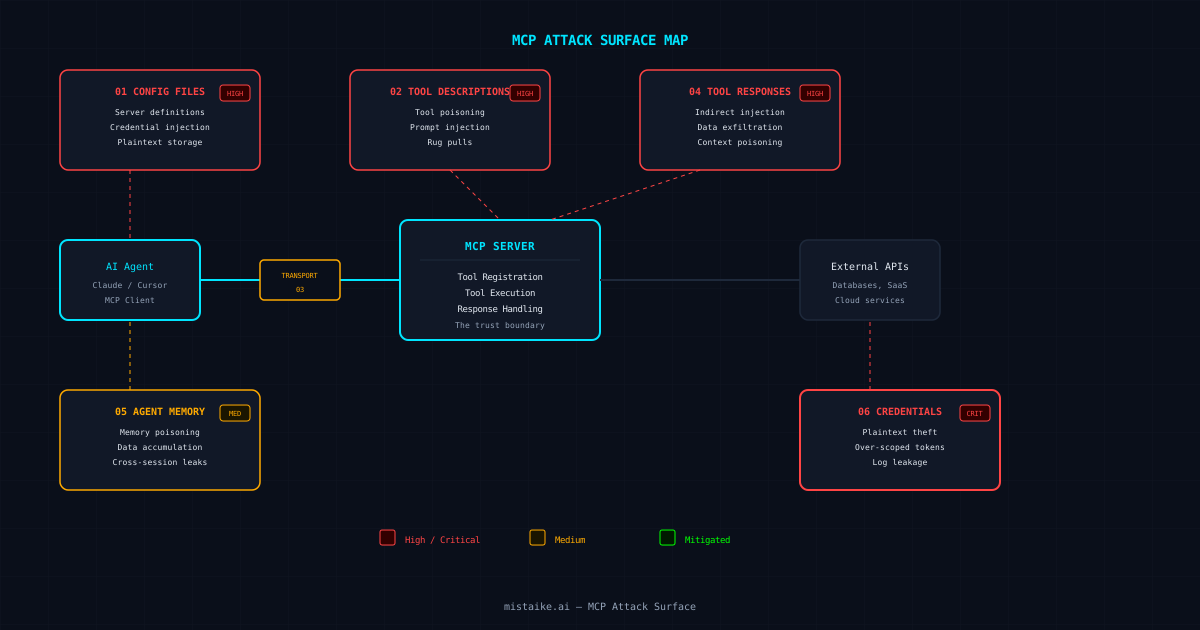
Every system has an attack surface. The MCP ecosystem is no different. What makes it worth understanding is that MCP sits at the intersection of AI agents, developer tools, and production infrastructure — three domains with very different security assumptions. The attack surface below covers six zones. Each one is real, each one has been exploited (or demonstrated as exploitable), and each one has practical mitigations.
Configuration Files
High RiskMCP config files define which servers to connect to and what credentials to pass. A compromised config file can redirect all tool traffic through an attacker-controlled server. Config files are often stored in plaintext, sometimes committed to git, and rarely audited after initial setup.
Attack Vectors
- ✗Config injection via malicious repo clone
- ✗Credential harvesting from committed configs
- ✗Server redirect via config tampering
Mitigations
- ✓Git-ignore all MCP config files
- ✓Use environment variables for credentials
- ✓Audit configs on every session start
Tool Descriptions
High RiskTool descriptions are the primary interface between MCP servers and AI agents. The agent reads the description to decide when and how to use the tool. A malicious description can manipulate the agent into calling the tool in unintended ways, exfiltrating data through tool parameters, or bypassing safety controls.
Attack Vectors
- ✗Tool poisoning via adversarial descriptions
- ✗Prompt injection embedded in tool metadata
- ✗Rug pull: tool description changes after trust is established
Mitigations
- ✓Pin tool versions and review description changes
- ✓Use an MCP firewall to validate descriptions
- ✓Monitor for description drift between versions
Transport Layer
Medium RiskMCP uses either stdio (local) or HTTP+SSE (remote) transport. Local stdio is harder to intercept but grants the tool full process-level access. Remote HTTP transport is susceptible to standard web attacks: MITM, replay, session hijacking. Many local setups skip TLS because “it is just localhost.”
Attack Vectors
- ✗Man-in-the-middle on unencrypted HTTP transport
- ✗Session hijacking via stolen transport tokens
- ✗Replay attacks against stateless tool endpoints
Mitigations
- ✓TLS 1.3 for all remote connections
- ✓Mutual TLS for high-value tool servers
- ✓Request signing with nonces to prevent replay
Tool Responses
High RiskTool responses flow directly into the agent’s context. A malicious tool response can contain prompt injection instructions that the agent executes. This is indirect prompt injection — the attacker does not need access to the user’s prompt, just to a tool response the agent will read.
Attack Vectors
- ✗Indirect prompt injection via tool output
- ✗Data exfiltration instructions embedded in responses
- ✗Context poisoning with false information
Mitigations
- ✓DLP scanning on all tool responses
- ✓Response schema validation
- ✓Treat tool output as untrusted data, not instructions
Agent Memory
Medium RiskPersistent memory stores knowledge across sessions. Without proper controls, it becomes an unmonitored data store where secrets, PII, and sensitive business logic accumulate. An attacker who compromises the memory store compromises every future session that reads from it.
Attack Vectors
- ✗Memory poisoning with false or malicious content
- ✗Data exfiltration via memory search queries
- ✗PII/secret accumulation without expiry
Mitigations
- ✓DLP scanning on memory writes
- ✓Session-scoped access controls
- ✓TTLs on all stored memories
Credential Storage
Critical RiskMCP tools need credentials: API keys, database passwords, OAuth tokens. These credentials often have broader scope than the tool requires and are stored in config files, environment variables, or worse — hardcoded in tool source. A single compromised credential can cascade into full infrastructure access.
Attack Vectors
- ✗Credential theft from plaintext config files
- ✗Over-scoped tokens enabling lateral movement
- ✗Credential leakage via error messages or logs
Mitigations
- ✓Secret managers (Vault, AWS Secrets Manager) for all credentials
- ✓Minimum-scope tokens for every tool
- ✓Credential rotation with automated monitoring
Where to Start
You cannot fix everything at once. Prioritise based on your deployment model:
Local development (single developer)
Start with config files and credential storage. These are the most likely vectors for a local setup. SeeSecuring Your Local MCP Setup.
Team deployment (shared MCP servers)
Add transport security and tool descriptions to your priority list. Shared servers mean shared trust boundaries. SeeHardening MCP for Production.
Production service (customer-facing)
All six zones matter. Tool responses and agent memory become critical when untrusted input enters the system. Budget for a proper security review.
mistaike.ai’s MCP Firewallsits between your agents and your tools, providing real-time protection across all six attack surface zones. DLP scanning, tool validation, transport security, and audit logging in a single layer.
← All guides