MCP Security Guide
From Prototype to Production:
Hardening Your MCP Project
Your MCP setup works on localhost. Now you need to deploy it for real users. This is the graduation checklist — everything between “it works on my machine” and “it is ready for production traffic.”
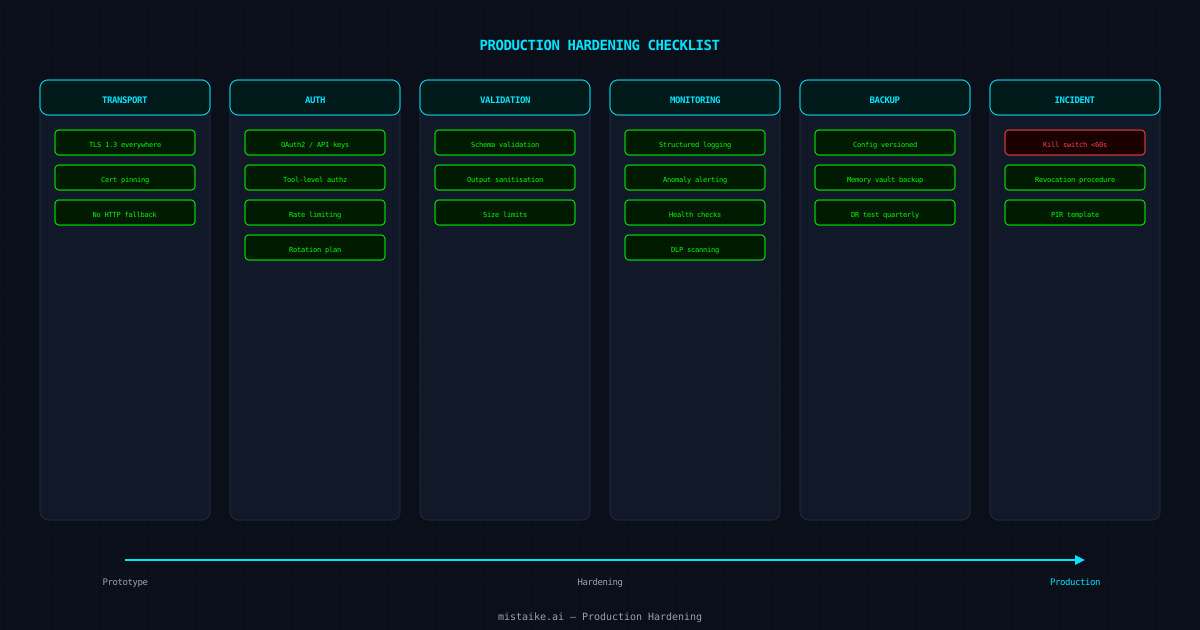
This checklist is opinionated. Some items are non-negotiable (TLS, authentication). Others depend on your threat model (certificate pinning, DLP scanning). Work through it top to bottom. If you skip something, document why — your future self during an incident will thank you.
Phase 1
Transport Security
TLS everywhere
Every MCP connection must use TLS 1.3. No exceptions for internal services — internal networks get compromised too. Use Let’s Encrypt or your org’s CA. Terminate TLS at the load balancer or reverse proxy, not at the MCP server itself.
Certificate pinning for critical paths
For high-value connections (e.g., your MCP server to a database proxy), pin certificates to prevent MITM attacks even if a CA is compromised.
Disable HTTP fallback
Redirect HTTP to HTTPS at the infrastructure level. MCP servers should refuse non-TLS connections, not silently downgrade.
Phase 2
Authentication and Authorisation
API key or OAuth2 for every client
No anonymous MCP access in production. Every client connection must present credentials. OAuth2 with short-lived tokens is preferred over long-lived API keys.
Scoped permissions per tool
Not every authenticated client should access every tool. Implement tool-level authorisation so that a client with read-only access cannot invoke write tools.
Rate limiting per client
Prevent any single client from monopolising server resources or running up costs on external APIs. Start with conservative limits and adjust based on real usage patterns.
Credential rotation plan
Document how to rotate every credential your MCP deployment uses. Test the rotation process before you need it in an incident.
Phase 3
Input and Output Validation
Schema validation on all inputs
Every tool should validate its inputs against a schema before processing. Reject malformed requests at the boundary, not deep in the business logic.
Output sanitisation
Tool responses should not leak internal paths, stack traces, or credentials. Implement a response filter that strips sensitive patterns before they reach the client.
Size limits
Set maximum request and response sizes. An unbounded tool response can crash clients or exhaust memory. 1MB is a reasonable default for most tools.
Phase 4
Monitoring and Observability
Structured logging
Log every tool invocation with: timestamp, client ID, tool name, input parameters (sanitised), response status, and latency. Use structured JSON logs that your observability stack can parse.
Alerting on anomalies
Alert on unusual patterns: sudden spikes in tool usage, new tools being registered, authentication failures, error rate increases. These are your early warning system.
Health checks
Expose a /health endpoint that verifies the MCP server can reach its dependencies. Use this for load balancer checks and uptime monitoring.
DLP scanning
Run Data Loss Prevention scanning on both requests and responses. Catch secrets and PII before they leave your network.
Phase 5
Backup and Recovery
Configuration backup
MCP server configs, tool definitions, and policy rules should be version-controlled and recoverable. If your MCP server dies, you need to rebuild it from config, not from memory.
Memory vault backup
If you use persistent memory, back it up. Memory vaults contain operational knowledge that took sessions to build. Losing it means relearning everything.
Disaster recovery test
Quarterly, destroy your MCP deployment and rebuild it from backups. If you cannot do this in under an hour, your recovery process needs work.
Phase 6
Incident Response
Kill switch
You need to be able to disable all MCP tool execution in under 60 seconds. A feature flag, a load balancer rule, or a firewall rule — whatever works, but it must be fast and tested.
Credential revocation procedure
If credentials are compromised, you need a documented, tested process to revoke and rotate them. This includes client API keys, database credentials, and external API tokens.
Post-incident review template
Have a template ready for MCP-specific incidents. Include: which tools were affected, what data was exposed, what the blast radius was, and what needs to change.
The Graduation Test
Before you declare your MCP deployment production-ready, answer these five questions:
- 01Can an unauthenticated client access any tool? (Answer must be no.)
- 02Can you disable all tool execution in under 60 seconds? (Test it.)
- 03Can you rebuild the entire deployment from backups? (Time it.)
- 04Can you identify who called which tool and when? (Check your logs.)
- 05Can you rotate every credential without downtime? (Prove it.)
mistaike.ai’s MCP Gatewayhandles TLS termination, authentication, rate limiting, DLP scanning, and audit logging out of the box — so you can focus on building tools, not infrastructure.
← All guides