MCP Security Guide
“Is This MCP Tool Safe?”
A Developer’s Guide to Risk Assessment
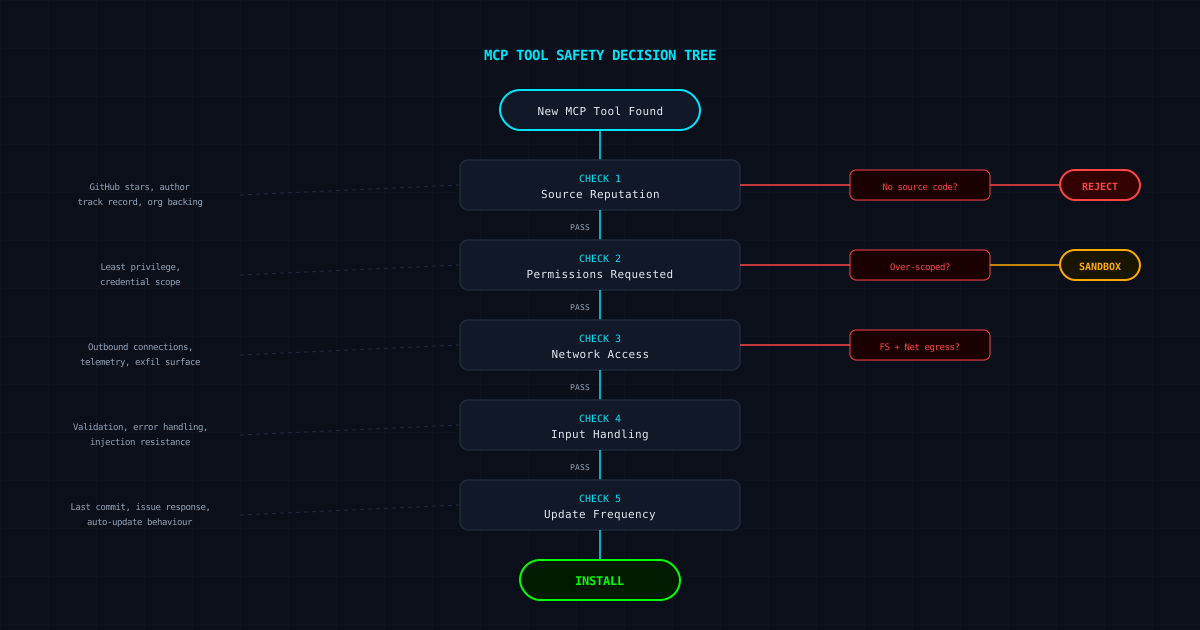
You found an MCP server that does exactly what you need. Before you add it to your config, run it through this framework. Five checks, three minutes, one decision.
The Problem With “Just Install It”
MCP tools run with your permissions. They can read your files, make network requests, and access whatever credentials you have configured. The npm/pip “just install it” reflex does not apply here. An MCP tool is not a library you import — it is a process you grant access to your development environment.
This guide gives you a repeatable framework. No security degree required. Just five checks you can run in the time it takes to brew a coffee.
Check 1
Source Reputation
Where did this tool come from, and who maintains it?
GitHub presence
Does the repo exist? How many stars? Stars alone mean nothing, but zero stars on a tool claiming wide adoption is a red flag. Check the contributor list — a single anonymous account with no other repos warrants caution.
Author track record
Is the author known in the ecosystem? Do they maintain other packages? A developer with a history of maintained projects is lower risk than a fresh account publishing their first and only package.
Organisation backing
Tools published under a recognised org (Anthropic, a known company, a well-established OSS foundation) carry implicit accountability. Not a guarantee of safety, but a meaningful signal.
Check 2
Permissions Requested
What does the tool actually need access to, and does it ask for more than it should?
Principle of least privilege
A tool that formats JSON should not need filesystem write access. A database query tool should not need network egress to arbitrary hosts. Compare what the tool does with what it asks for.
Scope creep in tool descriptions
Read the tool descriptions in the MCP manifest. Vague descriptions like “general helper” or “utility tool” make it impossible to reason about what the tool will actually do. Specific descriptions are a good sign.
Credential requirements
Does it need API keys, tokens, or database credentials? If so, are they scoped appropriately? A tool that needs your GitHub token with full repo access when it only reads issues is over-permissioned.
Check 3
Network Access
Does this tool phone home, and where does it send data?
Outbound connections
A local-only tool should make zero network requests. If it talks to an external API, that API endpoint should be documented and predictable. Runlsof -i -P while the tool runs to see what connections it actually makes.
Telemetry and analytics
Some tools send usage data. This is not inherently bad, but it should be disclosed and opt-in. Undisclosed telemetry is a deal-breaker.
Data exfiltration surface
Any tool with both filesystem read access and network egress can exfiltrate data. This combination deserves the highest scrutiny. If a tool needs both, you should understand exactly why.
Check 4
Input Handling
How does the tool handle unexpected or malicious input?
Input validation
Does the tool validate its inputs, or does it blindly execute whatever the agent sends? Check the source code for parameter validation, type checking, and bounds checking. Tools that pass raw input to shell commands or SQL queries are immediate rejects.
Error handling
What happens when the tool fails? Does it log errors safely, or does it dump stack traces that might include credentials or file paths? Good error handling is a proxy for overall code quality.
Prompt injection resistance
If the tool processes text that might contain adversarial instructions, does it treat that text as data or as commands? Tools that pass user-supplied content back into agent prompts without sanitisation are vulnerable to indirect prompt injection.
Check 5
Update Frequency
Is this tool actively maintained, and how does it handle updates?
Last commit date
A tool last updated two years ago is not necessarily unsafe, but it will not have patches for recently discovered MCP vulnerabilities. The MCP spec is still evolving — tools need to keep up.
Issue responsiveness
Are security issues addressed promptly? Check the issue tracker for security-related reports and how quickly they were resolved. A maintainer who ignores security reports is a warning sign.
Auto-update behaviour
Does the tool update itself silently? Silent auto-updates are a supply chain risk. Pin your versions and review changelogs before upgrading. This is especially important for tools that run with elevated permissions.
Red Flags That Should Stop You
- ✗No source code available — binary-only distribution
- ✗Tool description is vague or does not match actual behaviour
- ✗Requests permissions far beyond its stated purpose
- ✗Makes undocumented network connections
- ✗Passes raw input to shell commands or SQL queries
- ✗No input validation on parameters
- ✗Maintainer has no public track record
- ✗Last updated before the current MCP spec version
- ✗Combines filesystem access with network egress without clear justification
- ✗Stores credentials in plaintext config files
The Decision
After running the five checks, you will land in one of three places:
INSTALL
Known author, appropriate permissions, no unnecessary network access, validates inputs, actively maintained. Go ahead.
SANDBOX FIRST
Useful tool but one or two concerns. Run it in a sandboxed environment, monitor its behaviour, and restrict its permissions to the minimum needed. See oursandboxing guide.
REJECT
Multiple red flags, no source code, or permissions that cannot be justified. Find an alternative or build your own. The cost of a compromised development environment is always higher than the cost of writing a tool.
Want to automate this assessment?mistaike.ai’s MCP Firewallevaluates tool safety in real time, blocking tools that fail configurable policy checks before they ever execute.
← All guides