Practical Guide
Why You Should Sandbox Every MCP Server
An MCP server is third-party code with tool access to your infrastructure. Running it unsandboxed is running arbitrary code with your credentials. Here is how to stop doing that.
Updated March 2026 · ~10 min read
The Incident
CVE-2025-6514: 437K Downloads, CVSS 9.6
In mid-2025, a vulnerability was discovered in a widely-used MCP server package with 437,000 downloads. The flaw — an unauthenticated remote code execution vulnerability — scored CVSS 9.6. An attacker could send a crafted tool call that triggered arbitrary command execution on the host system, then exfiltrate data through the tool response channel.
For deployments running the server directly on the host (which was most of them), this meant full system compromise: file system access, credential theft, lateral movement to other services on the same machine.
For the handful of deployments running the server in a sandboxed container with read-only filesystem and no network egress, the blast radius was contained to the sandbox. The attacker got code execution inside a container with nothing useful in it.
That is the entire argument for sandboxing, demonstrated in one CVE.
Concepts
Blast Radius Reduction
Sandboxing is not about preventing vulnerabilities. It is about limiting what an attacker can do after exploiting one. This is blast radius reduction — the difference between "attacker has your entire server" and "attacker has an empty container that restarts in 2 seconds."
The principle is defence-in-depth: assume every MCP server will eventually be compromised (through RCE, supply chain attack, or tool poisoning), and design your deployment so that compromise is contained.
Host
No isolation. Compromise = full system access, all credentials, all data, lateral movement to any reachable service.
Blast radius: Total
Container
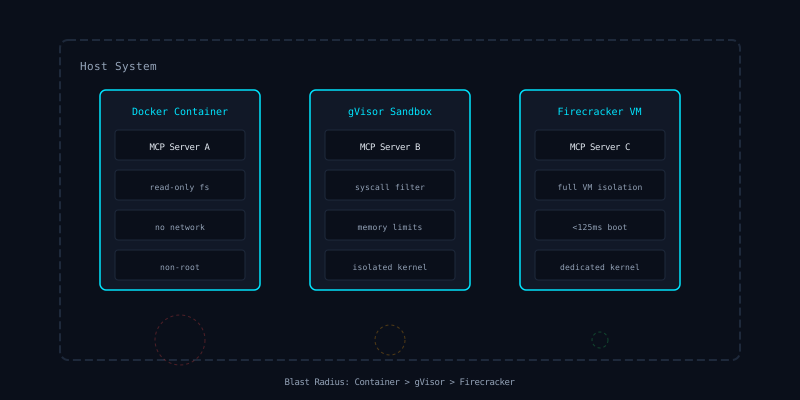
Process-level isolation. Compromise = access within the container only. No host filesystem, no other containers, no network (if configured).
Blast radius: Limited
MicroVM
Full VM isolation with dedicated kernel. Compromise = access within the VM. Kernel exploits do not reach the host. Near-zero shared attack surface.
Blast radius: Minimal
Option 1
Docker: The Minimum Viable Sandbox
Docker containers are not a security boundary by default. A container with default settings shares the host kernel, can escalate privileges, and may have network access to your entire infrastructure. But a properly hardened Docker container is a meaningful isolation layer.
Here is a production-ready Dockerfile for running an MCP server:
FROM node:22-slim AS build
WORKDIR /app
COPY package*.json ./
RUN npm ci --omit=dev
COPY src/ ./src/

FROM node:22-slim
RUN groupadd -r mcp && useradd -r -g mcp -s /bin/false mcp
WORKDIR /app
COPY --from=build /app ./
USER mcp

# Health check for container orchestration
HEALTHCHECK --interval=30s --timeout=3s \
  CMD node -e "process.exit(0)"

ENTRYPOINT ["node", "src/index.js"]
And the corresponding docker run command with security flags:
docker run \
  --read-only \
  --security-opt=no-new-privileges \
  --cap-drop=ALL \
  --network=none \
  --memory=256m \
  --cpus=0.25 \
  --pids-limit=32 \
  --storage-opt size=100m   --tmpfs /tmp:rw,noexec,nosuid,size=64m \
  # Limits are fixed per tier (not user-configurable)
  # Defaults: 0.25 CPU, 256MB memory, 100MB storage, 32 PIDs
  my-mcp-server:latest
Key flags explained:
- ▶
--read-only— filesystem is immutable. No writing malware to disk. - ▶
--no-new-privileges— blocks setuid/setgid escalation. - ▶
--cap-drop=ALL— removes all Linux capabilities. The process cannot bind privileged ports, load kernel modules, or change file ownership. - ▶
--network=none— no network access. The server communicates only via stdin/stdout (stdio transport) or a mounted Unix socket. - ▶
--pids-limit=32— prevents fork bombs.
Resource limits are fixed per tier
On-demand customisation is not available today. The default limits are: 0.25 CPU, 256 MB memory, 100 MB storage, 32 PIDs. Higher subscription tiers receive increased allocations automatically.
Need custom resource limits for your deployment? Contact us to discuss your requirements.
Option 2
gVisor: User-Space Kernel Isolation
gVisor (runsc) is Google's container sandbox runtime. It intercepts all syscalls and processes them through a user-space kernel called Sentry. The container never touches the host kernel directly.
This matters because most container escapes exploit kernel vulnerabilities. If the container shares the host kernel, a kernel exploit gives the attacker host access. With gVisor, the container interacts with a sandboxed kernel implementation — kernel exploits in the container do not affect the host.
gVisor integrates with Docker and Kubernetes as an OCI runtime. Switching is a one-line configuration change:
# Docker: use gVisor runtime
docker run --runtime=runsc \
  --read-only \
  --security-opt=no-new-privileges \
  --cap-drop=ALL \
  --network=none \
  my-mcp-server:latest

# Kubernetes: RuntimeClass
apiVersion: node.k8s.io/v1
kind: RuntimeClass
metadata:
  name: gvisor
handler: runsc
---
apiVersion: v1
kind: Pod
spec:
  runtimeClassName: gvisor
  containers:
    - name: mcp-server
      image: my-mcp-server:latest
      securityContext:
        readOnlyRootFilesystem: true
        allowPrivilegeEscalation: false
        capabilities:
          drop: ["ALL"]
Trade-off: gVisor adds 5-15% syscall overhead. For MCP servers doing I/O-bound work (most of them), this is negligible. For compute-heavy workloads, benchmark first.
Option 3
Firecracker: MicroVM Isolation
Firecracker is AWS's microVM hypervisor, originally built for Lambda and Fargate. Each MCP server runs in a lightweight VM with its own kernel. The VM boots in under 125ms and uses as little as 5MB of memory overhead.
This is the strongest isolation level available without bare-metal separation. The attack surface between the VM and the host is minimal — just the Firecracker VMM process, which is written in Rust and heavily audited.
Firecracker is best suited for deployments where MCP servers process highly sensitive data or where regulatory requirements demand VM-level isolation. The operational overhead is higher than containers — you need to manage VM images and configure virtio networking — but the security properties are unmatched.
Isolation Comparison
| Property | Docker | gVisor | Firecracker |
|---|---|---|---|
| Kernel isolation | Shared | User-space | Dedicated |
| Boot time | <1s | <1s | <125ms |
| Memory overhead | ~10MB | ~30MB | ~5MB |
| Syscall filtering | seccomp | Sentry kernel | VM boundary |
| Container escape risk | Medium | Low | Very low |
Recommendation
Which Sandbox Should You Use?
Start with hardened Docker containers. They are the easiest to deploy, integrate with every CI/CD pipeline, and provide meaningful isolation when properly configured. The Dockerfile and run flags above are your baseline.
Upgrade to gVisor for untrusted servers. If you are connecting to community MCP servers, open-source tools, or anything you did not build yourself, gVisor's kernel-level isolation is worth the minimal overhead.
Use Firecracker for regulated environments. Financial services, healthcare, government — if your compliance framework requires VM-level isolation or if a breach has existential consequences, Firecracker is the right choice.
The one thing you should never do is run MCP servers directly on the host. After CVE-2025-6514, that is indefensible.
Sandboxing Is Layer Two. You Need All Five.
Isolation limits blast radius, but it does not inspect traffic. Combine sandboxing with inline scanning, DLP, and audit logging for complete MCP security.