Why Local Sandboxing Isn't Enough for MCP Servers
Local sandbox tools solve the isolation problem on your laptop. They don't solve DLP, CVE exposure, egress control, or team-wide policy. Here's where the gap is — and why it matters when you're building for other people.
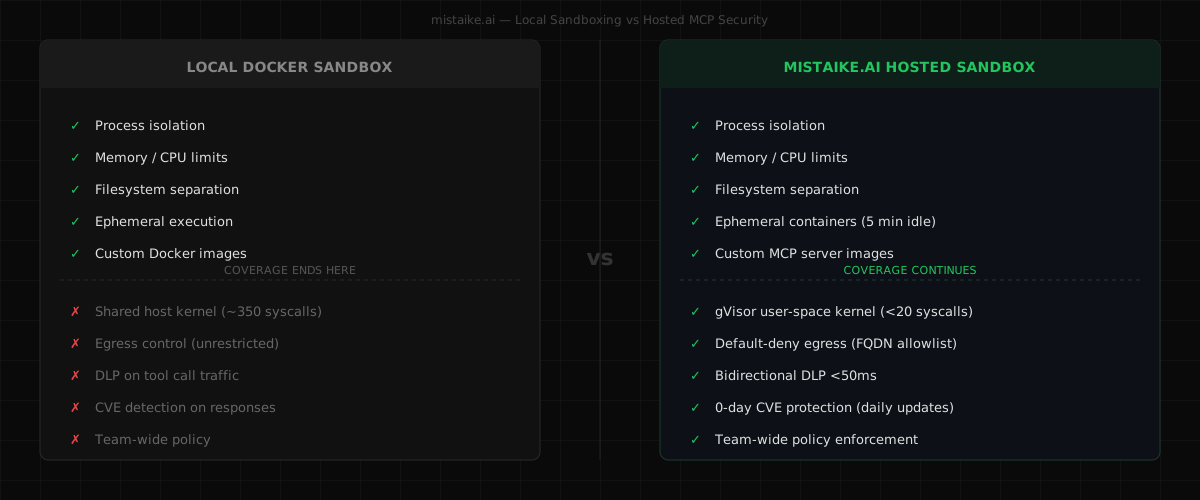
Local sandbox tools for MCP servers are solving a real problem. They solve it well on a developer's machine. That's not the same as solving it when your agent handles other people's data.
This post looks at what tools like sandbox-mcp (by Navendu Pottekkat) and code-sandbox-mcp (by Automata Labs) actually provide, where they stop, and what that gap costs you once agents are running against real user data.
What Local Sandbox Tools Do Well
Navendu Pottekkat built sandbox-mcp to address a concrete problem: LLMs that generate code can't execute it safely. His write-up explains the design clearly. The tool spins up Docker containers on your local machine, routes code execution through them, and returns output to the agent — without touching your host system directly.
The OS hardening in sandbox-mcp is real work. Containers drop all Linux capabilities (capDrop: ["all"]), set no-new-privileges: true, and run with a read-only filesystem — only specific mount points are writable. Resource limits are configurable per-sandbox (CPU, memory, process count, file quotas). These are not defaults you get from vanilla Docker; Pottekkat made deliberate choices to reduce privilege at the OS layer.
Code-sandbox-mcp, from Automata Labs, takes a more minimal approach — Docker container lifecycle management exposed as MCP tools (sandbox_initialize, sandbox_exec, copy_file, sandbox_stop) without the same documented OS hardening. It's useful for flexible, image-driven execution, with the container configuration left to the operator.
Both tools have the same scope: isolate code execution on a developer's local machine. That scope is well-defined and both tools serve it honestly.
The Shared Kernel Problem
Docker containers — including hardened ones — share the host operating system kernel. Every system call from every container on your machine is handled by the same kernel, regardless of cap-drop configuration.
Capability drops restrict what a process can do with valid operations: they won't prevent exploitation of a kernel vulnerability itself. Linux exposes roughly 350 system calls. Palo Alto's Unit 42 describes the core issue: traditional containers are "not truly sandboxed" because they share the host OS kernel, and the attack surface is the full syscall table. A container escape via a kernel vulnerability — CVE-2022-0492 (cgroups bypass), CVE-2019-5736 (runc overwrite) — gives an attacker direct access to the host, independent of how the container was configured.
The mistaike.ai sandbox runs MCP servers inside a user-space kernel (gVisor runsc). Instead of passing system calls directly to the host kernel, gVisor's Sentry intercepts them and implements them in user space. The host kernel exposure drops to fewer than 20 syscalls for the entire sandbox. Google's gVisor documentation describes this: gVisor and similar approaches reduce the kernel attack surface to under 10% of Linux's full syscall count, as documented in Unit 42's research.
This is a qualitatively different isolation model, not a stricter configuration of the same model.
The Egress Gap
sandbox-mcp disables network access in its shell sandbox — that's a genuine safeguard for untrusted shell execution. But the Go, Java, JavaScript, Rust, network-tools, and APISIX sandboxes enable network access because they need it. Code-sandbox-mcp doesn't document egress restrictions at all.
For MCP servers specifically, network access isn't optional — they need to call APIs, connect to databases, fetch data. You can't disable the network and still have a functional MCP tool.
That means a sandboxed MCP server running on your machine, through either tool, can reach any external endpoint it wants. No filtering, no allowlist, no logging of what it connects to.
This matters when an MCP server is compromised — whether by a supply chain attack, a malicious dependency, or a CVE in a library it uses. A compromised container with unrestricted network access can exfiltrate data over plain HTTP, reach internal network endpoints, or beacon to any external host. The container isolation protects your filesystem and process space. It doesn't protect your network.
The mistaike.ai sandbox enforces default-deny egress via an Envoy proxy. MCP servers declare the external FQDNs they need (maximum 10, no wildcards). Everything else is blocked before a packet leaves the container.
No DLP on Tool Call Traffic
When your agent calls an MCP tool, two things flow through the connection: the request (which may contain secrets, PII, or sensitive business data) and the response (which may contain the same, or injected content).
Local sandbox tools operate at the process execution layer — Docker container isolation is about filesystem and process separation, not protocol inspection. They don't intercept and analyse the MCP protocol data flowing in and out.
If your agent passes an AWS credential as part of a tool call parameter, it passes through. If a tool response includes a database connection string from a third-party data source, your agent processes it.
Bidirectional DLP scanning on every tool call intercepts both directions in under 50ms. Outbound: credentials and PII are caught before they reach third-party code. Inbound: sensitive data patterns in responses are redacted before your agent acts on them. Every match is logged with what triggered, what rule matched, and what was redacted.
No 0-Day CVE Protection
When you install an MCP server locally, you're pulling in its entire dependency tree. A compromised package — whether from a supply chain attack or a newly disclosed vulnerability — runs with whatever permissions the container has. Local sandbox tools don't scan those dependencies or alert you when one goes bad.
Traditional vulnerability scanners check committed code in CI. They don't continuously monitor the MCP servers you're actually running, and they don't inspect what those servers return.
mistaike.ai provides 0-day CVE protection: every tool response is checked against known CVE patterns, updated daily or more frequently as new vulnerabilities are disclosed. If a registered MCP server is found to have a compromised dependency, it's quarantined immediately — pulled from service before it can process another request. This protection is free on all plans, including the gateway tier.
See the full CVE registry →
No Team-Wide Policy
Local sandbox tools are per-developer configurations. Each engineer maintains their own Docker setup, their own sandbox images, their own resource limits. There is no shared policy.
At team scale, when the same MCP server is being called from five machines with five different sandbox configurations, the effective security posture is the weakest configuration in the group. There's no centralised audit log spanning all connections.
Team-wide policy means one set of rules applies to all agent traffic from all team members. A policy change propagates immediately across all connections. The audit log shows what happened across the full team, not just one developer's local environment.
What This Actually Means If You're Building for Users
The sections above describe technical gaps. But the reason those gaps matter isn't technical — it's about what you can promise the people who depend on what you build.
If you're a freelancer building agent workflows for clients: Your client is going to ask how their data is protected. "I run the MCP server in a Docker container on my machine" is an honest answer, but it doesn't give them anything to audit. With DLP scanning and an immutable audit log, you can show them exactly what data flowed through, what was caught, and what rules were applied. That's the difference between a verbal assurance and a verifiable control. For enterprise clients, this is often a prerequisite — not a nice-to-have.
If you're a solo founder shipping your first AI product: The gap between prototype and product is the gap between "it works" and "it's safe for other people's data." Local sandboxing gets you through the prototype phase. But when your first real user puts their API key into your tool, or your agent processes a customer's database query, you need to know that data isn't leaking through a compromised MCP tool response. You probably don't have time to build that scanning infrastructure yourself, and you shouldn't have to. That's the kind of thing you should be able to buy for the cost of a couple of coffees a month.
If you're a small team and your agent connects to third-party MCP servers: You control your own code, but you don't control what's in the dependency trees of community MCP servers. A compromised package in a popular tool means every agent using it is exposed. 0-day CVE protection means every response is scanned and compromised servers are quarantined automatically — you don't have to notice the advisory yourself. Without that, you're trusting every upstream maintainer to never get compromised. That's a bet that doesn't scale.
If you're building an internal tool for your team: Even if the data isn't customer-facing, it's still sensitive. Internal tools often have less scrutiny than production systems, which makes them better targets. A centrally managed policy that applies DLP and CVE scanning across all team members' agent connections means one engineer's local Docker misconfiguration doesn't become the weakest link.
If you're evaluating tools and wondering when to make the switch: There's no urgency to move off local sandboxing while you're prototyping. Local tools are fine for development. The trigger point is when real data enters the picture — your users' data, client data, production API keys, anything you'd care about losing. That's when the gap between process isolation and content-aware security becomes material. The free gateway tier lets you add CVE protection to your existing setup without changing how your servers are deployed, so you can close the most critical gap first and move to managed hosting when you're ready.
Where Local Tools Fit
Local sandbox tools are the right choice for:
- Development and testing on your own machine, where production-grade policy enforcement is overhead
- Short-lived code experiments where kernel-level isolation is acceptable risk
- Any context where the agent isn't processing real user data or touching production systems
They're good tools solving a real problem at the right scope. The issue isn't that they're inadequate — it's that the problem changes shape when you go from building for yourself to building for other people, and the tooling needs to change with it.
Side by Side
| code-sandbox-mcp | sandbox-mcp (pottekkat) | mistaike.ai hosted sandbox | |
|---|---|---|---|
| Process isolation | Docker (defaults) | Docker + cap-drop all + no-new-privs + read-only FS | gVisor user-space kernel |
| Host kernel exposure | ~350 syscalls | ~350 syscalls | <20 syscalls |
| Egress control | None | None (shell only has network disabled) | Default-deny, FQDN allowlist |
| DLP scanning | None | None | Bidirectional, <50ms |
| 0-day CVE protection | None | None | Daily updates, response scanning, auto-quarantine |
| Content safety | None | None | Prompt injection detection |
| Secrets handling | Operator-defined | Operator-defined | Envelope-encrypted, memory-injected |
| Team policy | Per-developer | Per-developer | Org-wide, instant propagation |
| Audit log | None | None | Per-scan, immutable |
| Hosted option | No | No | Yes |
The security architecture page has a full breakdown of how each layer is implemented.
Getting Started
If you're running MCP servers locally and want to close the CVE gap first: connect your existing tools through the mistaike.ai gateway. You get 0-day CVE protection on every tool response immediately, at no cost, without changing how your servers are deployed.
If you're ready for managed hosting with the full isolation stack: start free → and follow the setup guide →.
Nick Stocks is the founder of mistaike.ai.