Architecture Guide
What Is an MCP Mesh? Architecture, Use Cases, and Security
As multi-agent systems scale beyond one agent and one server, you need a mesh. Here is what that means, when you need one, and how to secure it.
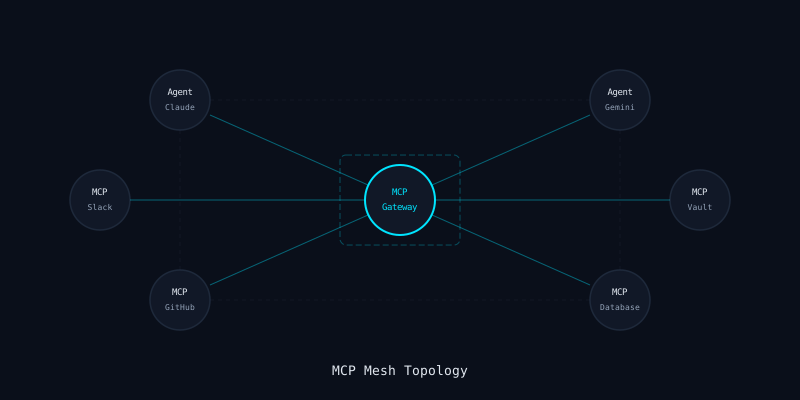
Updated March 2026 · ~10 min read
Definition
From Point-to-Point to Mesh
In the simplest MCP deployment, one agent connects to one server. The agent discovers the server's tools, calls them, and processes the responses. This is point-to-point — and it works fine until you need more.
An MCP mesh is a topology where multiple agents connect to multiple MCP servers through a shared routing layer. Instead of each agent managing its own server connections, a central gateway (or a set of federated gateways) handles discovery, routing, authentication, and policy enforcement.
Think of it as a service mesh for AI agent tooling. Just as Istio or Linkerd manage service-to-service communication in microservices, an MCP mesh manages agent-to-tool communication in multi-agent systems.
Patterns
Three Mesh Topologies
Hub-and-Spoke
All agents connect to a single gateway. The gateway fans out to all MCP servers. This is the simplest mesh topology and the easiest to secure — one chokepoint for all traffic.
Best for: single-team deployments, 1-10 MCP servers
Federated
Multiple gateways, each owning a subset of MCP servers. Gateways can forward requests to each other for cross-domain tool access. Each team manages their own gateway with their own policies.
Best for: multi-team orgs, 10-100 MCP servers
Full Mesh
Every agent can potentially reach every MCP server, with routing handled dynamically. This offers maximum flexibility but requires sophisticated policy enforcement at every node.
Best for: platform teams, 100+ MCP servers
Most production deployments today use hub-and-spoke. It provides the best security properties with the least operational complexity. Federated meshes are emerging in larger organizations where different teams own different tool domains.
Use Cases
Why Build a Mesh?
Shared Tool Access
Multiple agents need the same tools — GitHub, Slack, Jira, databases. Without a mesh, each agent maintains its own connection to each server, duplicating auth configuration, consuming server resources, and creating inconsistent audit trails. A mesh centralises these connections: one authenticated session per server, shared by all agents with appropriate authorization.
Agent Collaboration
In multi-agent workflows, agents need to hand off context and coordinate tool usage. A planning agent might identify tasks, delegate to specialist agents (code, test, deploy), and aggregate results. The mesh provides the shared infrastructure that makes this possible — capability discovery, context routing, and tool-level access control.
Context Routing
Not every tool call should go to every server. Context routing directs calls to the right server based on tool name, agent identity, request content, or custom rules. A mesh gateway can route database queries to a read replica for analytics agents while directing writes to the primary for deployment agents.
Capability Discovery
As your MCP server fleet grows, agents need a way to discover what tools are available without being configured with every server endpoint. A mesh gateway aggregates tool listings from all connected servers, presenting a unified capability catalog to agents. New servers are discovered automatically; decommissioned ones disappear from the catalog.
Security
Mesh Security Considerations
A mesh simplifies management but expands the attack surface. More connections mean more paths for lateral movement, more credentials to manage, and more trust boundaries to enforce. Here are the critical security considerations.
Trust Boundaries
Every connection in a mesh crosses a trust boundary. Agent-to-gateway, gateway-to-server, and gateway-to-gateway connections all require separate authentication and authorization. A compromised agent should not be able to access tools beyond its authorized scope. A compromised server should not be able to influence other servers through the gateway. Define explicit trust boundaries and enforce them at every hop.
Lateral Movement
In a mesh, a compromised node has more paths to explore. If an attacker compromises one MCP server, can they use the mesh to reach other servers? Can they escalate from one agent's permissions to another's? Network segmentation within the mesh is essential — each server should only be reachable through the gateway, never directly from another server. Agent sessions must be isolated so that compromising one does not grant access to another's tools.
Credential Isolation
A mesh gateway holds credentials for every connected MCP server. This makes the gateway a high-value target — compromise it and you have access to everything. Credentials must be isolated per-server and per-agent: use separate credential stores, rotate independently, and ensure that a credential leak for one server does not expose others. The gateway should never store credentials in memory longer than a single request.
Observability
A mesh multiplies the volume of MCP traffic. Without centralized logging and monitoring, attacks get lost in the noise. Every mesh hop should log the full request chain — which agent, which gateway, which server, what tool, what arguments, what response. Correlation IDs must span the entire mesh path so that incident investigation can reconstruct the full attack chain.
Reference Architecture
Secured MCP Mesh Pattern
A production MCP mesh combines a gateway with inline security scanning. Agents connect to the gateway over authenticated channels. The gateway routes tool calls to the appropriate server, scanning every request and response for threats. All traffic is logged with correlation IDs for audit.
┌─────────────┐     ┌─────────────────────────────────┐     ┌──────────────┐
│  Agent       │────▸│  MCP Gateway                    │────▸│  MCP Server  │
│  (Claude)    │     │  ┌───────────┐ ┌──────────────┐ │     │  (GitHub)    │
│              │◂────│  │ Auth/AuthZ│ │ DLP Scanner  │ │◂────│              │
└─────────────┘     │  └───────────┘ └──────────────┘ │     └──────────────┘
                    │  ┌───────────┐ ┌──────────────┐ │
┌─────────────┐     │  │ Schema    │ │ Audit Logger │ │     ┌──────────────┐
│  Agent       │────▸│  │ Validator │ │              │ │────▸│  MCP Server  │
│  (Gemini)    │     │  └───────────┘ └──────────────┘ │     │  (Database)  │
│              │◂────│                                 │◂────│              │
└─────────────┘     └─────────────────────────────────┘     └──────────────┘
                                    │
                                    ▼
                           ┌──────────────┐
                           │  MCP Server  │
                           │  (Slack)     │
                           └──────────────┘
mistaike.ai Is a Mesh-Ready MCP Gateway
One gateway endpoint, multiple agents, multiple MCP servers. Inline scanning, DLP, and audit logging on every mesh hop.