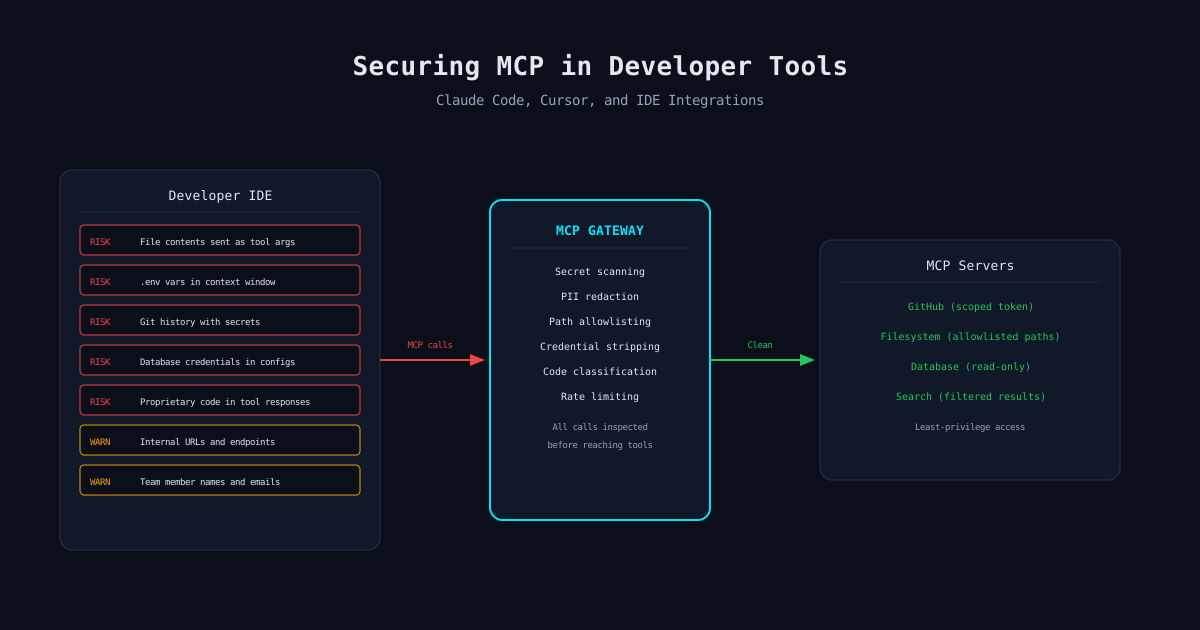
The Risk
What Developer Tool Calls Actually Leak
When a developer uses Claude Code or Cursor on a codebase, the AI agent needs context to be useful. It reads files, searches code, runs tests, checks git history. Each of these operations is an MCP tool call, and each tool call can carry sensitive data.
This is not theoretical. It is the normal operating mode of these tools. The agent reads your source code to understand it. That source code may contain hardcoded credentials, internal API endpoints, customer data in test fixtures, and proprietary business logic. All of it flows through tool calls.
File Contents
Every file the agent reads becomes part of the context. Configuration files with database URLs, API keys in development configs, internal documentation with architecture details. The agent does not distinguish sensitive from non-sensitive content.
Environment Variables
Agents running terminal commands can access environment variables. .env files, shell profiles, and process environments may contain production credentials, service tokens, and internal URLs.
Git History
Git log and git show expose the complete history of the repository. Secrets that were committed and then removed are still in the history. The agent can read them through git tool calls.
Terminal Output
Commands run by the agent produce output that enters the context. Database query results, API responses, test output with real data, error messages with connection strings, all become tool call content.
Workspace Metadata
File paths reveal project structure. Package.json reveals dependencies. Docker configs reveal infrastructure. Even the presence of certain files (terraform/, .aws/, k8s/) reveals your technology stack.
Team Information
Git blame reveals team member names and emails. PR comments contain internal discussions. Code review threads may reference internal systems, incident details, or customer names.
Where It Goes
The Data Flow You Are Not Tracking
In a typical IDE MCP setup, tool calls flow from the editor to local MCP servers, and from those servers to external services. The developer sees the agent reading files and running commands. What they do not see is the full data flow:
Local to Model Provider
Tool call results are sent to the model provider (Anthropic, OpenAI) as context for the next response. Your source code, environment variables, and terminal output are now in an API request to an external service.
Local to External MCP Servers
If the developer has configured external MCP servers (GitHub, Jira, Slack), the agent can send data from local file reads to those external services. A file path or code snippet in a Slack message tool call is data exfiltration through a legitimate channel.
Cross-Tool Data Flow
The agent reads a database connection string from a config file (filesystem tool), then uses it to connect to the database (database tool), then includes query results in a GitHub comment (GitHub tool). Three tools, one data exfiltration path.
Configuration
How to Configure MCP-Powered IDEs Safely
You cannot make these tools completely safe without an MCP gateway, but you can reduce the attack surface with proper configuration.
File System Restrictions
# .claude/settings.json or equivalent
{
  "allowedPaths": ["src/", "tests/", "docs/"],
  "blockedPaths": [
    ".env*",
    "**/*.pem",
    "**/*.key",
    "**/secrets/",
    "**/credentials/",
    ".git/",
    "terraform/",
    ".aws/"
  ],
  "blockedPatterns": [
    "password\s*=",
    "api_key\s*=",
    "PRIVATE KEY"
  ]
}
MCP Server Restrictions
Only enable the MCP servers your developers actually need. Every additional server is additional attack surface.
Git Safety
Before enabling any MCP tools on a repository, run a secret scanner on the git history. Tools like gitleaks or truffleHog will find credentials that were committed and removed. The agent can still access these through git log and git show tool calls. Clean the history or restrict git tool access to specific commands.
The Real Solution
MCP Gateway as a Protection Layer
IDE-level configuration is a band-aid. Developers can modify their local settings. Path restrictions do not prevent data from flowing between tools. And you have no visibility into what data actually moved through tool calls.
The correct architecture is an MCP gateway that sits between the IDE and all MCP servers. The IDE connects to the gateway, not directly to tool servers. The gateway enforces organization-wide policies regardless of local IDE configuration.
Centralized Policy
One policy set for the entire organization. Developers cannot bypass it by editing local config files.
Secret Scanning
Every tool call argument and response scanned for secrets before they leave or enter the developer machine.
PII Detection
Customer data in test fixtures, database responses, and log output caught and redacted in real time.
Audit Trail
Complete record of every tool call across every developer. Compliance team can answer who accessed what and when.
Rate Limiting
Per-developer, per-tool rate limits prevent runaway agents and limit the blast radius of any single session.
Cross-Tool Analysis
Detect data flowing from sensitive tools (filesystem, database) to external tools (GitHub, Slack) and block it.
Deployment
Rolling Out MCP Security to Your Engineering Team
Developers will resist security controls that slow them down. The key is deploying in monitor mode first, showing them what data is actually flowing through their tool calls, and then enabling enforcement. Most engineers are surprised by what their IDE sends through MCP.
Deploy the gateway in passthrough mode. Log all tool calls. Do not block anything. Generate a report of sensitive data found in tool calls per developer.
Share anonymized findings with the engineering team. "Here are the types of sensitive data flowing through your MCP tool calls." Let the data make the case for controls.
Enable DLP scanning with warnings, not blocks. Developers see notifications when sensitive data is detected. They learn what triggers the rules.
Enable blocking for high-confidence detections (known secret formats, obvious PII). Keep monitoring mode for lower-confidence rules while tuning.
The Bottom Line
MCP-Powered IDEs Are a DLP Blind Spot
Claude Code and Cursor are powerful developer tools. They are also the widest data exfiltration surface in your engineering organization. Every file read, every terminal command, every git operation moves data through tool calls that your existing security stack cannot see.
The solution is not to ban these tools. Your developers will use them anyway, or leave for companies that allow them. The solution is to put a security layer between the IDE and the tools, the same way you put a WAF between the internet and your applications. An MCP gateway is that layer.
mistaike.ai
Secure Your Developer MCP Tools
mistaike.ai drops in as an MCP gateway between developer IDEs and tool servers. Secret scanning, PII detection, and audit logging with zero workflow disruption.
See How It Works