The Metrics That Matter
What to Track for MCP in Production
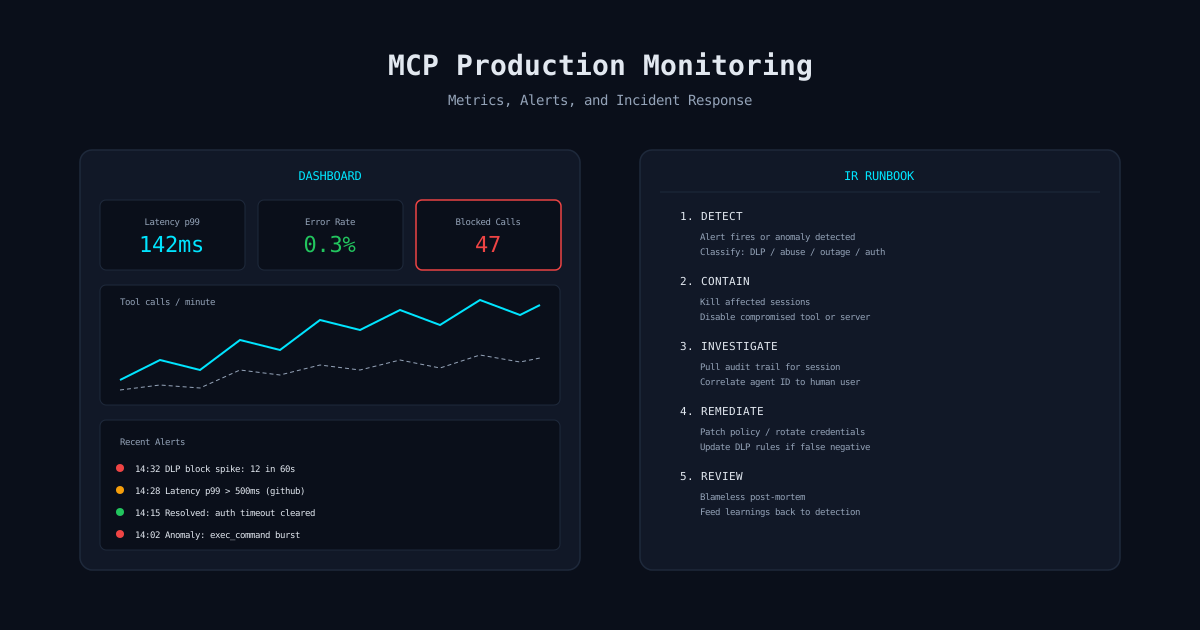
MCP monitoring is not application monitoring with different labels. The metrics that matter for MCP security are different from the metrics that matter for uptime. You need both, but conflating them means you miss security signals in the noise of operational data.
Operational Metrics
Tool call latency (p50, p95, p99)
Latency spikes indicate tool server issues or policy engine bottlenecks. Sustained high latency degrades agent performance.
Error rate by tool and server
Distinguish between tool-level errors (bad arguments) and server-level errors (connectivity). Persistent errors on a single tool often indicate a breaking change upstream.
Throughput (calls/minute by tool)
Capacity planning and baseline establishment. You cannot detect anomalies without knowing what normal looks like.
Session duration and call count
Understand agent behavior patterns. Sessions with unusually high call counts may indicate loops or misuse.
Security Metrics
DLP block rate (blocks/minute)
The most important security metric. Trending upward means either increased attack activity or a new data flow hitting existing rules.
Policy denial rate by tool
Tools with high denial rates are either misconfigured or targeted. Investigate both.
Unique tools per session
Sessions accessing an unusually wide range of tools may indicate credential compromise or prompt injection.
Cross-tool data flow volume
Track how much data moves between tools within sessions. Spikes suggest data exfiltration attempts.
Alert Design
Alerts That Trigger Action, Not Fatigue
The goal is not to alert on everything. The goal is to alert on things that require human decision-making. Every alert should have a clear action. If the action is “look at the dashboard and decide if this is a problem,” the alert is not ready for production.
# Alert definitions
alerts:
  - name: dlp_block_spike
    condition: dlp_blocks > 10 in 60s
    severity: critical
    action: "Page on-call. Potential active exfiltration."
    runbook: "#ir-dlp-block-spike"

  - name: tool_error_sustained
    condition: error_rate > 20% for tool X over 5m
    severity: warning
    action: "Check tool server health. Disable tool if unresponsive."
    runbook: "#ir-tool-degradation"

  - name: session_anomaly
    condition: tool_diversity > 3x baseline for session type
    severity: warning
    action: "Review session audit trail. Kill if suspicious."
    runbook: "#ir-session-anomaly"

  - name: auth_failure_burst
    condition: auth_failures > 5 in 30s from same source
    severity: critical
    action: "Block source IP. Investigate credential compromise."
    runbook: "#ir-auth-failure"

  - name: latency_degradation
    condition: p99_latency > 2s for any tool over 10m
    severity: warning
    action: "Check tool server. Scale if capacity issue."
    runbook: "#ir-latency"
Anomaly Detection
Detecting What Rules Cannot Catch
Static alert thresholds catch known patterns. Anomaly detection catches novel attacks and unexpected behavior. For MCP, the most valuable anomaly detection targets are:
Tool Call Sequence Anomalies
Build a baseline of normal tool call sequences per session type. A code review session that suddenly calls database tools is anomalous even if each individual call is within policy. Sequence analysis catches multi-step attacks that per-call analysis misses.
Argument Content Drift
Track the semantic fingerprint of tool arguments over time. If arguments for a particular tool suddenly contain different types of content (e.g., code snippets appearing in search queries that previously contained only natural language), investigate.
Temporal Patterns
Agents used during business hours that suddenly start making calls at 3 AM. Sessions that typically last 10 minutes running for hours. These temporal anomalies often indicate compromised credentials being used from different time zones.
Cross-Session Correlation
Multiple sessions from different users suddenly targeting the same tool with similar arguments. This can indicate a coordinated attack or a viral prompt injection that spreads across agent instances.
Incident Response
IR Runbook Template for MCP Security Incidents
MCP security incidents are different from traditional security incidents. The “attacker” might be the AI agent itself, acting on injected instructions. The “exfiltration channel” might be a legitimate tool call. Your IR process needs to account for this.
1. Detection and Classification
- ▶Identify the alert source: DLP block, policy denial, anomaly detection, or user report
- ▶Classify the incident type: data exfiltration, unauthorized access, prompt injection, tool abuse, or operational failure
- ▶Determine blast radius: single session, single user, or multi-session
- ▶Assign severity: Critical (active exfiltration), High (potential compromise), Medium (policy violation), Low (operational issue)
2. Containment
- ▶Kill affected sessions immediately for Critical/High severity
- ▶Revoke session credentials and any downstream tokens
- ▶If tool server compromise: disable the tool server across all sessions
- ▶If prompt injection: quarantine the injected content and block similar patterns
- ▶Preserve all audit logs and session data for investigation
3. Investigation
- ▶Pull the complete audit trail for affected sessions
- ▶Correlate session IDs to human users
- ▶Identify the entry point: which tool call introduced the malicious content?
- ▶Map the data flow: what data was accessed, where did it go?
- ▶Determine if data actually left the perimeter or was blocked by DLP
4. Remediation
- ▶Rotate any credentials that may have been exposed
- ▶Update DLP rules if the incident revealed a detection gap
- ▶Tighten tool policies if access was overly permissive
- ▶If prompt injection: update input validation and content filtering
- ▶Notify affected users and data owners per your notification policy
5. Post-Incident Review
- ▶Blameless post-mortem within 48 hours
- ▶Document: timeline, root cause, what detected it, what contained it, what could be improved
- ▶Feed detection improvements back into monitoring rules
- ▶Update this runbook with lessons learned
- ▶Brief leadership on incident and remediation
Tool Abuse Patterns
Known Attack Patterns to Monitor
Beyond anomaly detection, there are specific MCP attack patterns worth monitoring for explicitly:
Read-then-exfiltrate
Agent reads sensitive file, immediately calls external tool with similar content in arguments.
Credential harvesting
Sequential reads of configuration files, environment variables, and key stores across multiple tools.
Privilege escalation chain
Agent uses output from one tool to construct arguments that bypass restrictions on another tool.
Slow exfiltration
Small amounts of data encoded in tool arguments over many calls. Per-call DLP passes, but aggregate volume is suspicious.
Tool server poisoning
Tool responses contain instructions that redirect the agent to call other tools with sensitive data.
mistaike.ai
Production-Grade MCP Monitoring
mistaike.ai provides built-in monitoring, anomaly detection, and incident response tooling for MCP deployments. Every tool call is tracked, every anomaly is surfaced.
See How It Works