The Blind Spot
Traditional DLP Cannot See MCP Traffic
Data Loss Prevention was built for a world where humans copy files to USB drives and email spreadsheets to personal accounts. The detection patterns are well-understood: regex for credit card numbers in outbound email, fingerprinting for sensitive documents on cloud storage, endpoint agents watching clipboard operations.
MCP tool calls bypass all of it. When an AI agent calls read_file() and the response contains your AWS credentials, that data is now in the model context. When the agent then calls create_gist() with those credentials embedded in the arguments, traditional DLP sees a normal HTTPS request to an approved API endpoint. No file transfer. No email. No USB. No alert.
The fundamental problem: DLP operates at the network and endpoint layer. MCP operates at the semantic layer. There is an entire class of data movement that happens inside tool call arguments and responses that network-level inspection cannot meaningfully parse.
The Attack Surface
What Data Leaks Through Tool Calls
Secrets in Arguments
API keys, tokens, and passwords passed as tool parameters. An agent reads .env, then uses those values in subsequent tool calls to external services.
PII in Responses
Database query results containing customer data returned through tool responses. The agent now has PII in context and may reference it in future calls.
Credentials in Context Bleed
Credentials from one tool response leaking into arguments of a completely different tool call. The model does not distinguish sensitive from non-sensitive context.
Source Code Exfiltration
Proprietary code read via filesystem tools, then sent to external code analysis or search tools. Perfectly normal agent behavior, perfectly real data loss.
Infrastructure Details
Internal hostnames, network topology, and configuration details flowing from infrastructure tools to logging or communication tools.
The Solution
Semantic-Layer DLP for MCP
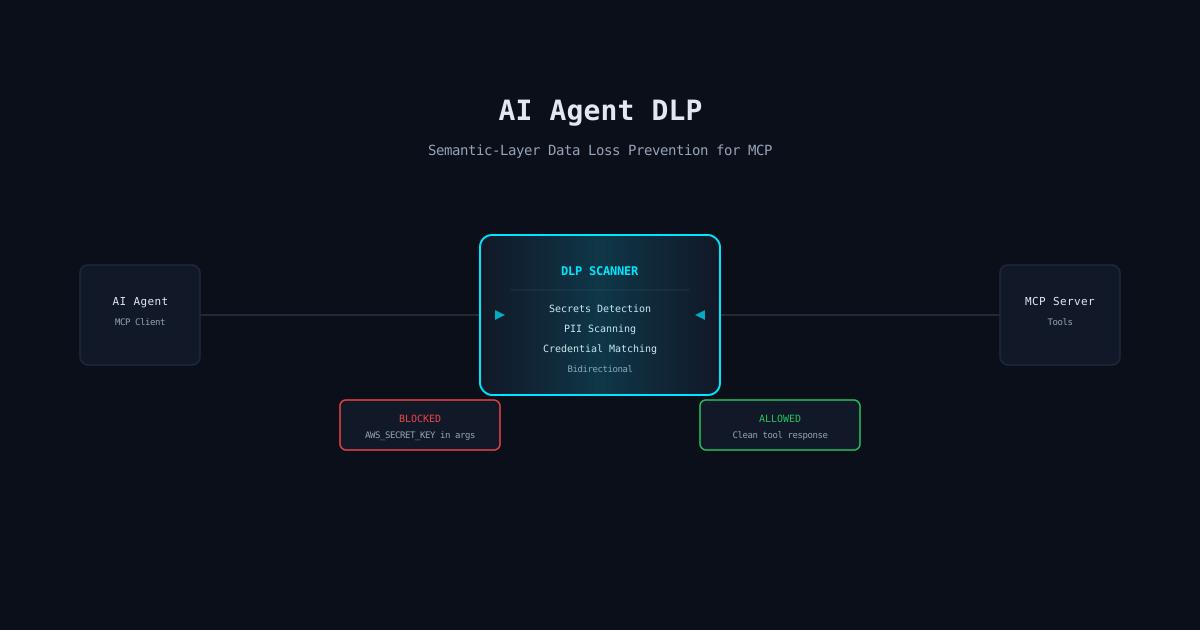
Effective MCP DLP operates at the protocol layer, not the network layer. It sits between the agent and the MCP servers, inspecting every tool call and every response before they reach their destination. This is not a firewall. It is a semantic scanner that understands the structure of MCP messages.
The key insight is bidirectional scanning. You need to inspect both directions of every tool call:
Outbound: Agent to Tool
Scan tool arguments for secrets, PII, credentials, and sensitive data before the call reaches the MCP server. Block or redact before transmission.
Inbound: Tool to Agent
Scan tool responses for sensitive data before they enter the model context. Flag, redact, or quarantine responses containing data above the session classification level.
Implementation
What to Scan and How
Effective MCP DLP requires multiple detection layers running on every tool call. No single technique catches everything.
Pattern Matching
Regex-based detection for known secret formats: AWS keys (AKIA...), GitHub tokens (ghp_...), JWTs, private keys. Fast, low false-positive, but only catches known formats.
Entropy Analysis
High-entropy string detection for unknown secret formats. Catches base64-encoded credentials and custom tokens that regex misses. Requires tuning to avoid false positives on legitimate encoded data.
PII Detection
Named entity recognition for emails, phone numbers, SSNs, addresses, and other personally identifiable information. Essential for GDPR and CCPA compliance.
Context-Aware Classification
Understanding what tool is being called and what data is appropriate for that tool. A database connection string in a DB query tool is expected. The same string in a Slack message tool is a DLP violation.
Cross-Call Correlation
Tracking data flow across multiple tool calls within a session. Detecting when data from a sensitive tool response appears in arguments to a less-trusted tool.
Policy Enforcement
Per-Tool DLP Policies
Not every tool needs the same DLP treatment. A read-only documentation search tool has different risk than a tool that can write to external APIs. Effective DLP lets you define policies per tool:
# DLP Policy Example
tools:
  github.create_gist:
    scan: [secrets, pii, credentials]
    action: block
    alert: security-team

  filesystem.read_file:
    scan: [secrets, credentials]
    action: redact-response
    log: true

  database.query:
    scan: [pii]
    action: mask-response
    mask_fields: [email, phone, ssn]

  slack.post_message:
    scan: [secrets, pii, credentials, source_code]
    action: block
    alert: security-team
    severity: critical
The policy engine makes per-tool decisions in real time. Blocking is the nuclear option. Redaction strips sensitive data while allowing the call to proceed. Masking replaces specific fields with placeholder values. Each action generates an audit event for compliance teams.
Reality Check
What Most Teams Get Wrong
The most common mistake is treating MCP DLP as a network security problem and bolting it onto the existing DLP stack. Network-level inspection of MCP traffic gives you TLS-encrypted JSON that your existing DLP cannot parse. You need protocol-aware inspection that understands MCP message structure.
The second mistake is scanning only outbound tool calls. If a tool response dumps your entire customer table into the model context, the damage is already done, even if you block the next outbound call. Inbound scanning is not optional.
The third mistake is deploying DLP in monitor-only mode indefinitely. Monitor mode generates dashboards. Block mode prevents data loss. Ship with blocking enabled for high-confidence detections from day one, and use monitor mode only for tuning lower-confidence rules.
mistaike.ai
MCP DLP That Actually Works
mistaike.ai provides bidirectional DLP scanning for MCP tool calls with secret detection, PII scanning, and per-tool policy enforcement out of the box.
See How It Works